Before you begin
- Pair your hearing aids (or streamer) with your phone and confirm phone audio plays through them.
- Turn your phone volume up.
- Get the meeting reader link or QR code from the host (it looks like
…/r/plus a room code). - The host must have the meeting started, and Offer audio to readers must be turned on for the room.
Steps
- Open the reader link on your phone
Scan the QR code, or tap the link the host shared. The All May Hear reader page for this meeting opens. - Wait until the page shows Connected (or Live)
If you see “Connecting…”, wait a moment. If the page says the room was not found or has ended, ask the host for a new link. - In Language, choose the spoken language
Pick the language people are speaking in the room (for example, English).
Do not pick a translation language if you only want the raw room sound. - Tap the headphones button (Listen along)
The headphones icon is next to the language menu. When Listen along is on, the button looks active.
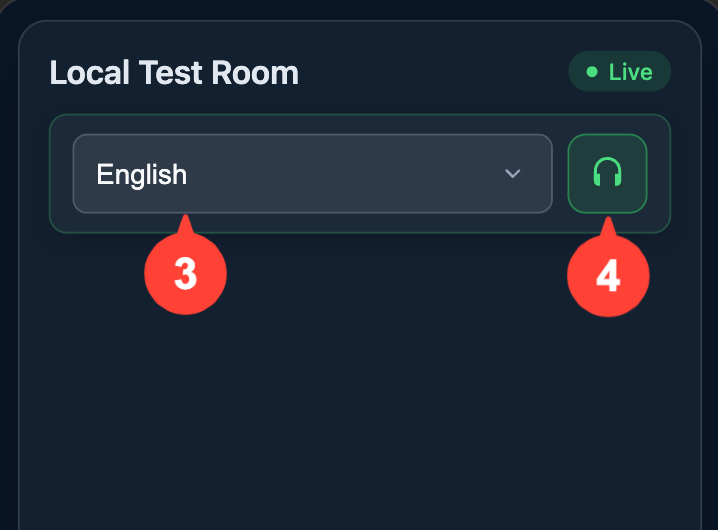
- If you see “Tap here to enable audio playback,” tap that banner
Phones often block sound until you tap once. After you tap, you should hear the live room audio in your hearing aids. - Keep the page open while you listen
You can leave the screen on or lock the phone; use your phone’s volume controls if you need it louder or quieter. Tap the headphones button again anytime to turn Listen along off.
Tips
- Music will not be broadcast over the audio feed. The audio feed will be muted during congregational hymns.
- If you hear a computer voice reading translations instead of the room, change Language back to the spoken language and make sure Listen along is still on.
- If the headphones button is missing, or you see a message that Listen along is not offered for the spoken language, ask the host to turn on Offer audio to readers in room settings and start (or restart) the meeting.
- Wi‑Fi is usually more reliable than cellular in a chapel or large building.
0 Comments
Add your comment